Free
5 endpoints, 10 certificate plans and up to 2 domains, with free certificates from Let's Encrypt and Google. Free costs nothing and needs no credit card.
Need Basic, Professional or Enterprise? Join the early-access list.
Get early accessCreate an account
Create a free sslbrain Cloud account. The account holds your license, downloads, and the status of your installations.
Download your docker-compose.yml
From the account overview you download a personalized docker-compose.yml with a one-time installation token. The file is bound to your account.
Run on your Docker host
Place the file on your Docker host and start the service with your usual Docker compose tooling. First boot activates the license and pulls the signed components using the token.
No credit card. Join the list and we will tell you when Community is ready to install.
Outbound only
The service connects outbound to fixed sslbrain endpoints, so no inbound ports from the internet are required.
All data local
Private keys, credentials and the rest of your data stay on the appliance. Cloud cannot fetch or see them.
Easy to remove
Stop the container and remove the volume, and there are no leftovers. The account can be re-used later.
System requirements
Minimum
- Docker Engine 24+ or Docker Desktop
- 4 GB RAM
- 40 GB disk space
- x86_64 or ARM64 architecture
Recommended
- 8 GB RAM for 25+ servers
- SSD storage for better performance
- Dedicated host or VM
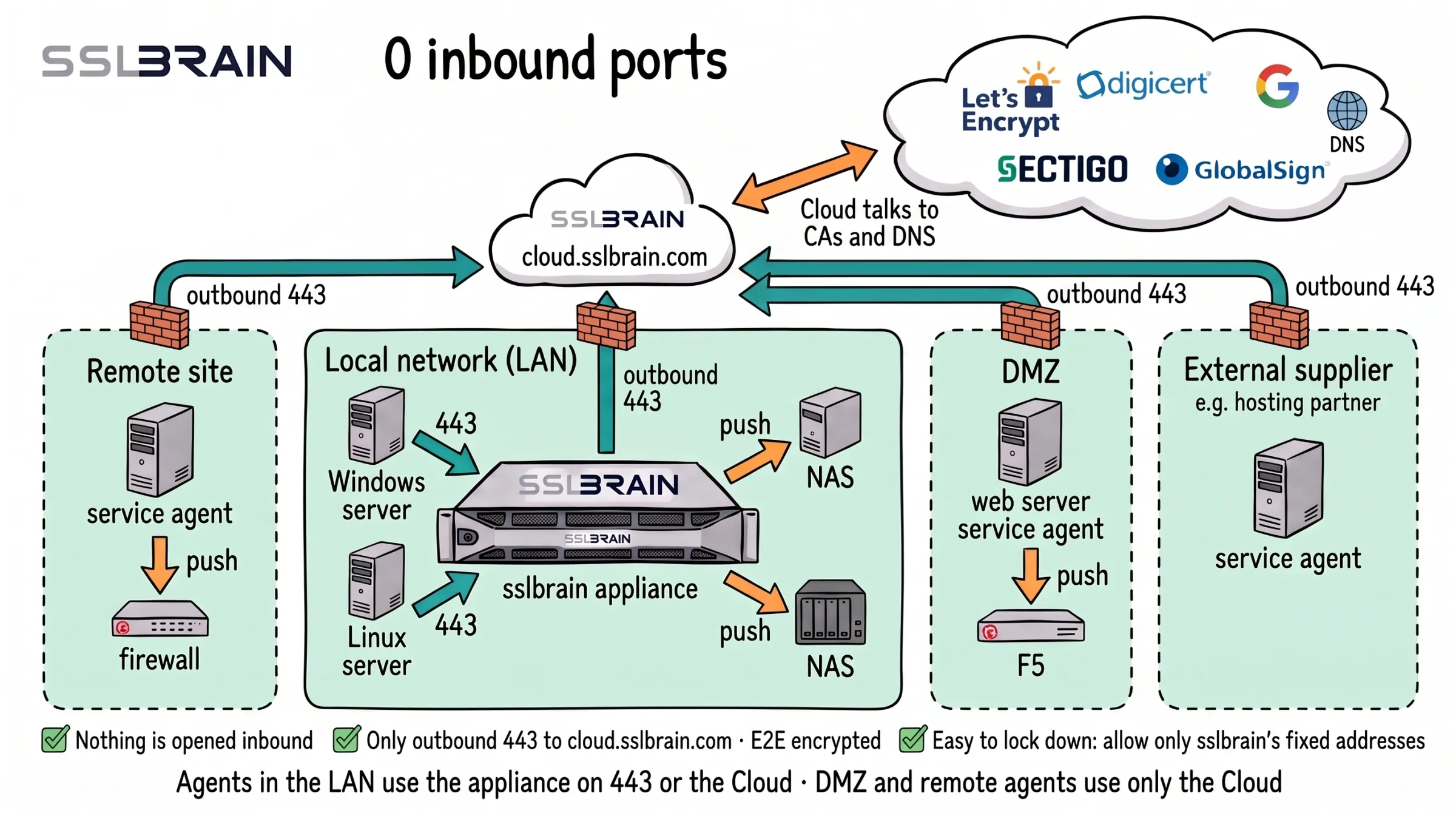
- Nothing is opened inbound: no network needs a port open from the internet.
- Through the firewall only outbound HTTPS on port 443 to sslbrain Cloud, cloud.sslbrain.com. The data is E2E encrypted.
- Easy to lock down: allow outbound 443 only to sslbrain’s fixed IP addresses. The security page in the manual lists every address and port the appliance uses.
- Service agents in the LAN reach the appliance on port 443 or go through sslbrain Cloud. Service agents in a DMZ, at a remote site or at an external supplier talk only to sslbrain Cloud.
- Inside the network ports are still used, but only locally: agents reach the appliance on 443, and the appliance or a service agent delivers to equipment such as a NAS, firewall or F5 over SSH (22) or the device’s API (usually 443). None of them needs an opening from the internet.
- In the Cloud flow the appliance talks only to sslbrain Cloud, and sslbrain Cloud talks to the CAs and DNS.
Network requirements
| Direction | Destination | Port | Purpose |
|---|---|---|---|
| Outbound | cloud.sslbrain.com | 443 | License validation, updates, vault |
| Outbound | acme.sslbrain.com | 443 | Certificate issuance |
| Outbound (local) | Your servers | Whatever ports your servers use for management (e.g. 22, 5985, 443) | sslbrain installs certificates on your servers |
| Inbound (local only) | Browser and local servers/agents | 443 | Admin UI for you, and the API your own servers and agents call |
cloud.sslbrain.com and acme.sslbrain.com share fixed IP addresses for firewall whitelisting. Inbound 443 is only for access from your own network, never from the internet.