Get started
Copy link to the page “Get started”The manual takes you from an installed appliance to the first certificate that sslbrain issues, installs on one of your servers and then renews on its own. The steps are in the order you carry them out.
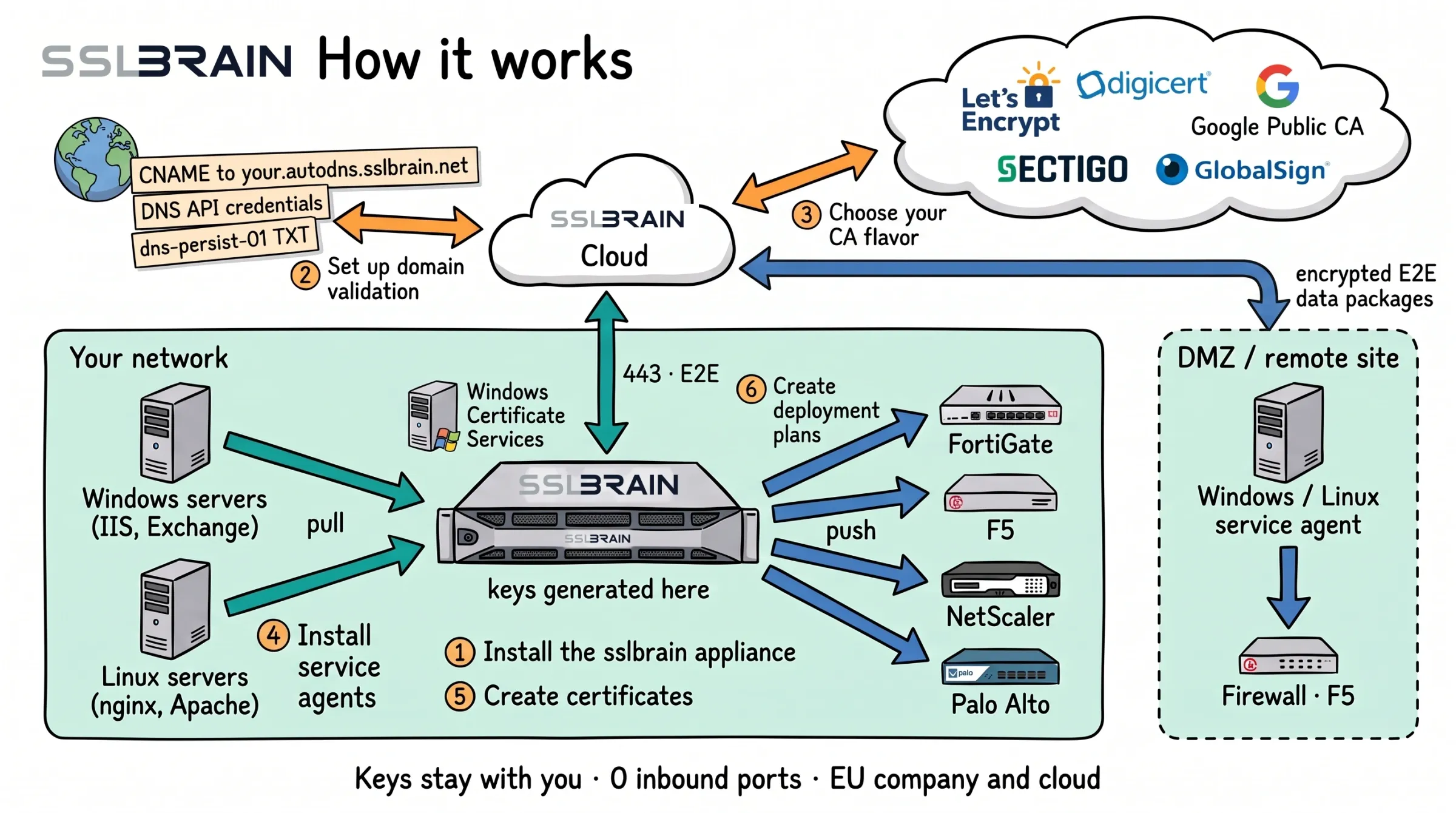
- Install the sslbrain appliance in your network. Private keys are generated here, and sslbrain Cloud never sees them.
- Set up domain validation: a CNAME to your.autodns.sslbrain.net, access to your DNS provider’s API, or a dns-persist-01 TXT record.
- Choose your CA: Let’s Encrypt, DigiCert, Google Public CA, Sectigo or GlobalSign, or your own Windows Certificate Services.
- Install service agents on Windows and Linux servers. They fetch their own certificates from the appliance; in a DMZ or at a remote site through sslbrain Cloud.
- Create certificates. sslbrain Cloud talks to the CA and to DNS; the appliance talks only to sslbrain Cloud, outbound on port 443.
- Create deployment plans: the appliance delivers to FortiGate, F5, NetScaler, Palo Alto and other equipment without an agent.
Transport: how the service agent fetches its tasks
The service agent always starts the connection itself, so it needs no inbound port on the server. The two ways are equal. A server can use one or both, and with both the agent tries the direct addresses first by default.
DirectThe server can reach the appliance.
Messages over the connection
- Task sslbrain appliance to Service agent
- Result Service agent to sslbrain appliance
Through sslbrain CloudThe server cannot reach the appliance, for example at a branch office or a hosting provider.
Passes on asynchronous, signed messages, encrypted so only the appliance and the agent can read them. Does not control the agent.
Messages over the connection
- Task sslbrain appliance to sslbrain Cloud to Service agent
- Result Service agent to sslbrain Cloud to sslbrain appliance
- A local choice on the server: with CloudDeny on Windows or --cloud-deny on Linux, the agent never goes through Cloud, whatever the appliance sends.
- The appliance never connects to the agent.
Execution: who installs the certificate where
The service agent installs certificates on its own server. Towards other destinations, the appliance or a service agent does the work through the destination’s API or SSH.
Who does the work
- sslbrain appliancein your network Runs in Bash Signs in with credentials from the vault.
- Windows service agenton its own Windows server Runs in PowerShell Fetches the task itself (diagram 1). Installs locally on its own server, with no network connection: for example IIS, Exchange, SQL Server
- Linux service agenton its own Linux server Runs in Bash Fetches the task itself (diagram 1). Installs locally on its own server, with no network connection: for example Nginx, Apache, Postfix
Push to other destinations: the appliance or a service agent
- Connection from the one doing the work to network devices and appliances: API over HTTPS, or SSH. Network devices and appliancesLoad balancers, firewalls, storage and hypervisors
- Connection from the one doing the work to cloud services: API over HTTPS. Cloud servicesAWS, Azure, Google Cloud, Cloudflare and Akamai
- Windows and Linux servers get certificates only through their own service agent.
- The appliance can find Windows servers and install the service agent on them, but never installs certificates around the agent.
- Least privilege: which scripts an agent may run is set on the server, and the appliance cannot change it. A Linux agent can make do with writing to the certificate folders you give it access to.
What you need ready
Copy link to the section “What you need ready”- An sslbrain Cloud account on which you are an owner or administrator. The account must have accepted the licensing terms and the data processing agreement.
- Room for the appliance: a virtual machine in VMware, Proxmox or KVM, or a Linux server with Docker. See Before you start.
- Administrator access to the servers that need certificates.
From installation to first certificate
Copy link to the section “From installation to first certificate”Start with step 1. Once the appliance answers in the browser, continue with step 2. Step 4 is optional.
- 1. Install sslbrain Install the appliance as a virtual machine in VMware, Proxmox or KVM, or in Docker on your own Linux server, and open it in your browser.
- 2. First-time setup Link the appliance to your sslbrain Cloud account, choose a licence, store the 12 backup words, and choose Auto or Manual.
- 3. A name and certificate for the appliance Give the appliance the free name under my.sslbrain.net, and it gets a trusted certificate with nothing more for you to do.
- 4. Find the certificates you already have Optional: scan the network and see which servers answer with TLS and when their certificates expire.
- 5. Connect servers Choose the guide for your servers: the service agent on Windows and Linux, or a connection without an agent for network equipment and cloud services.
- 6. Prove the domain is yours Create a CNAME delegation for each domain, so sslbrain can have certificates issued and renewed for it. A DNS API credential is the alternative.
- 7. Choose where certificates come from Use the Gratis Auto profile for free certificates, or get certificates from FairSSL, your own Windows CA or by upload.
- 8. First certificate on a server Create a rule that issues the certificate, installs it on the server and does so again on every renewal, then check that the server delivers it.
If a server is at a branch office, with a hosting provider or behind a firewall the appliance cannot get through, see Servers outside your network.
Get started on the appliance’s home page
Copy link to the section “Get started on the appliance’s home page”Once the appliance runs, its home page shows Get started with the three steps from a connected server to an installed certificate. A step is ticked when it has happened, not when you clicked it.
- Connect a server: the service agent is installed on a server and has checked in, or the appliance has reached a device without an agent (step 5). The service agent finds services and certificates on the server and carries out deploy rules. It does not choose certificates by itself.
- Create a deploy rule: a deploy rule decides which certificate is installed on which services, and renews it automatically (step 8). The certificate is issued from a certificate profile (step 7) for names you have proven are yours (step 6).
- Certificate installed: the rule has installed the certificate on one of your servers (check it).
Larger environments
Copy link to the section “Larger environments”Guides for specific situations, once the first server is running.
- Roll out the service agent to many Windows servers Install the service agent on many Windows servers at once with a GPO, or with a silent MSI installation from SCCM or Intune.
- Domains without a DNS API Validate domains whose DNS provider is not built into sslbrain: CNAME delegation, your own DNS server with RFC 2136, your own REST provider or a script.
- Internal certificates from Windows CA Issue and renew certificates from your own AD CS, and have the rules install them like any other certificate.
- Sign-in with Active Directory Let colleagues sign in to the appliance with their AD account, and give them a role based on their AD group.
- When the appliance is down What keeps working while the appliance is down, and how to bring it back: restart, reinstall, restore or a new appliance.
- Servers sslbrain does not know Get certificates onto an application that no package in the catalogue covers, with your own script uploaded as a custom agent.
- Move or restore the appliance Return the appliance to a backup after a fault, or move the licence to a new appliance when the machine is replaced.
- Audit and compliance Give the auditor access to the audit log, and find out who changed what, who can download private keys, and what the appliance does by itself.
Operations
Copy link to the section “Operations”Day-to-day work once certificates renew on their own.
- Keep an eye on your certificates Get an e-mail or a webhook call when a certificate, a deployment or a server needs action, and see status on Overview and Alerts.
- Keep sslbrain up to date Update the appliance to a signed version, choose what updates by itself, and update from the console if the web interface does not respond.
- Save a backup and restore from it Back up the appliance's data and keys, keep a copy off the appliance, and return the appliance to the moment the backup was taken.
- When something does not work Look up what the appliance shows you, and find the cause and what to do about it.
Reference
Copy link to the section “Reference”Look-ups on the appliance and sslbrain Cloud.
- Integrations Every place sslbrain installs certificates. Search, filter by operating system and type, and open the guide for each integration.
- Your own scripts Upload your own installation script in PowerShell, bash or Python as a custom agent, allow it on the server, and see examples, variables and agent.yml requirements.
- Users and sign-in Sign in with sslbrain Cloud or a local password, add colleagues with the right role, and keep track of the licence's logins.
- Security How the appliance protects the private keys, what the 12 backup words open, which data is sent out, what happens if something is compromised, and which ports must be open.
- Policy and audit What the appliance does on its own, which scripts the service agents may run, the domain limit on Free, and where the audit log is.
- Console menu Every item in the virtual appliance's console menu: status, network, logs, restart, update, disk space and Danger zone.
- sslbrain Cloud Your sslbrain Cloud account: appliances, installation files and requirements, licences and units, team, and moving a licence to another appliance.
- Support and diagnostics Send a support bundle to FairSSL, share diagnostics, approve a support partner, and open SSH for support for 24 hours.
- Tools Read a certificate, convert between PEM, PFX, DER and JKS, create and look up CAA records, and make a self-signed certificate for testing.
- Modules Download the modules your licence gives you, switch them on, and set up Windows CA and maintenance windows.