How sslbrain Works
Architecture, security, and data flow.
sslbrain Cloud and your sslbrain
Two distinct systems. Your data stays with you.
cloud.sslbrain.com
Your sslbrain
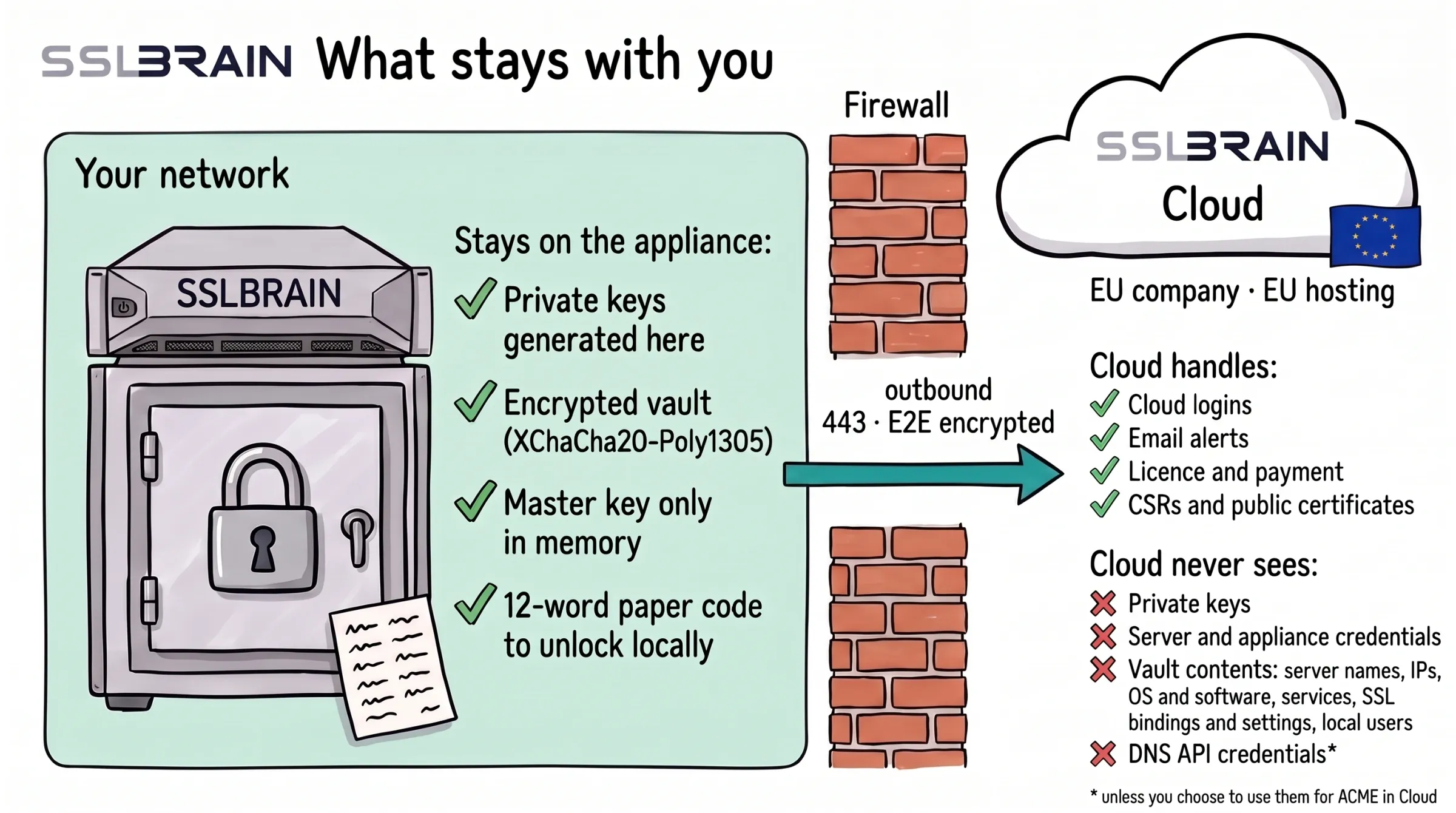
- Stays on the appliance: private keys generated here · encrypted vault (XChaCha20-Poly1305) · master key only in memory · 12-word paper code to unlock locally.
- The appliance talks only to sslbrain Cloud, outbound on port 443 and E2E encrypted. sslbrain Cloud is an EU company with EU hosting.
- Cloud handles: Cloud logins · email alerts · licence and payment · CSRs and public certificates.
- Cloud never sees: private keys · server and appliance credentials · vault contents (server names, IPs, OS and software, services, SSL bindings and settings, local users) · DNS API credentials* (*unless you choose to use them for ACME in Cloud).
Which data goes where
Your data stays on the appliance and is shown only in the local control panel, with local access. Cloud cannot fetch or see it.
Only what you use is sent out of the appliance: data about publicly issued certificates, sign-in to Cloud, data for the Cloud ACME server and client, and the server and certificate data you choose to include in email alerts.
Anonymous metadata is sent to Cloud when you issue certificates and use the DNS API proxy.
If you choose to, you can let Cloud receive selected diagnostic data, send server information in alert emails, and receive logs for troubleshooting and for improving the product and the agents.
DNS API credentials can stay on your network. The appliance calls the DNS provider directly or through our proxy with TLS all the way to the DNS provider, so Cloud cannot read them. If you want to use ACME clients directly against Cloud, you can choose to store them in Cloud.
The appliance's vault encrypts with XChaCha20-Poly1305 and a 256-bit key. Messages between the appliance and the service agents are signed and encrypted with AES-256-GCM, both directly and through Cloud, which cannot read them.
sslbrain and your servers
Two deployment models. No inbound ports required on targets.
Push
sslbrain connects to network devices and cloud services and deploys certificates directly.
Pull
The service agent fetches its tasks from sslbrain over HTTPS. Every message is signed and encrypted.
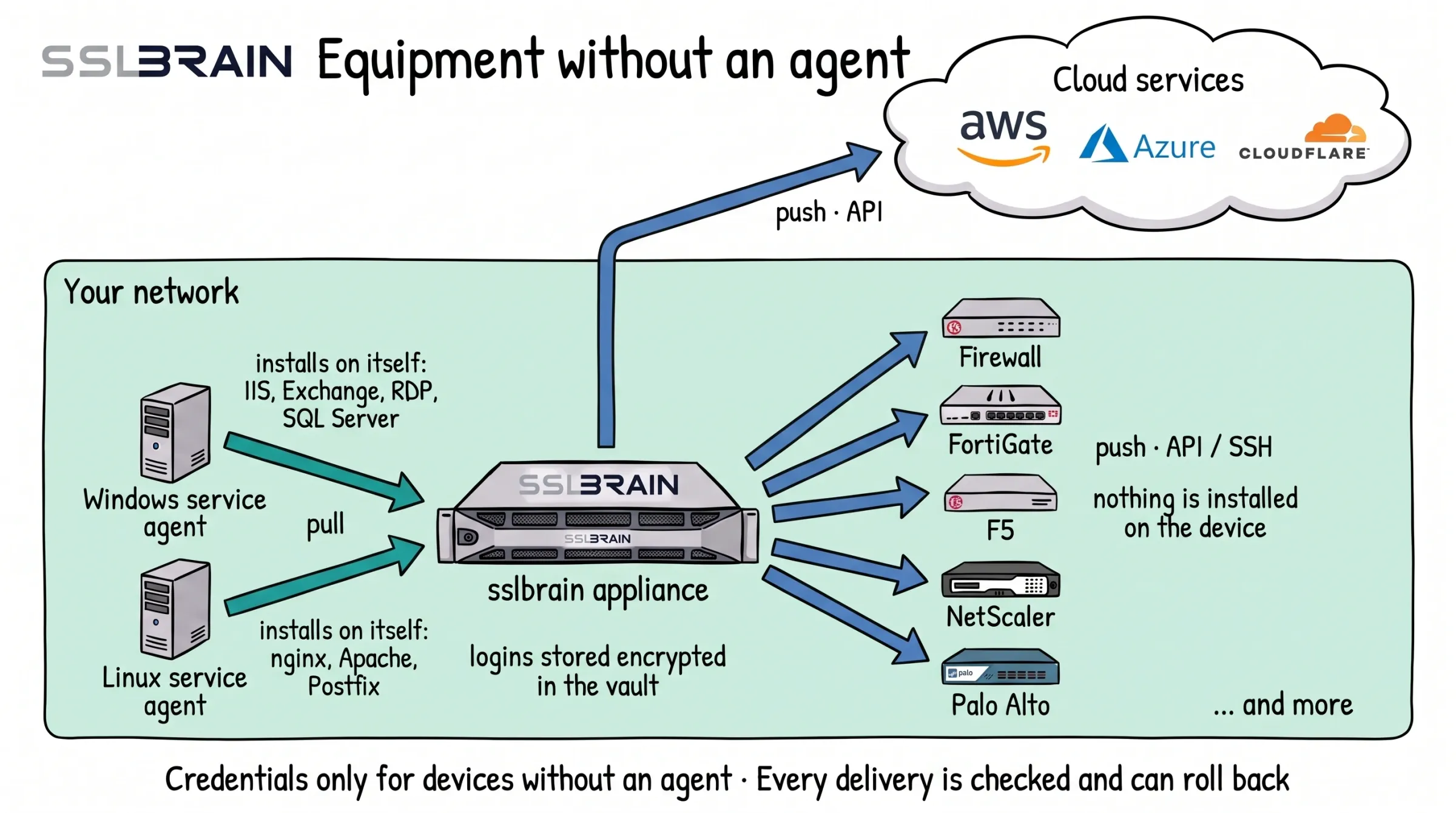
- Windows and Linux servers get a service agent. It fetches the certificate from the appliance and installs it on its own server: IIS, Exchange, RDP and SQL Server on Windows, nginx, Apache and Postfix on Linux.
- Equipment that cannot run an agent, such as FortiGate, F5, NetScaler and Palo Alto, gets the certificate from the appliance. It logs in through the device’s API (usually port 443) or over SSH (port 22) and installs it. Nothing is installed on the device.
- Cloud services such as AWS, Azure and Cloudflare get the certificate from the appliance through their API.
- The appliance stores logins only for equipment without an agent, encrypted in its vault. Every delivery is checked, and if it fails, sslbrain can roll back to the certificate that was there before.
This agent-based approach means sslbrain handles any platform with a certificate — Windows, Linux, macOS, or network appliances — through the same orchestration layer. No platform-specific licensing, no separate tools.
Many sites, one appliance
Servers at a branch office, in a DMZ or at a hosting provider get a service agent that goes through sslbrain Cloud. No VPN is needed, and no ports are opened inbound.
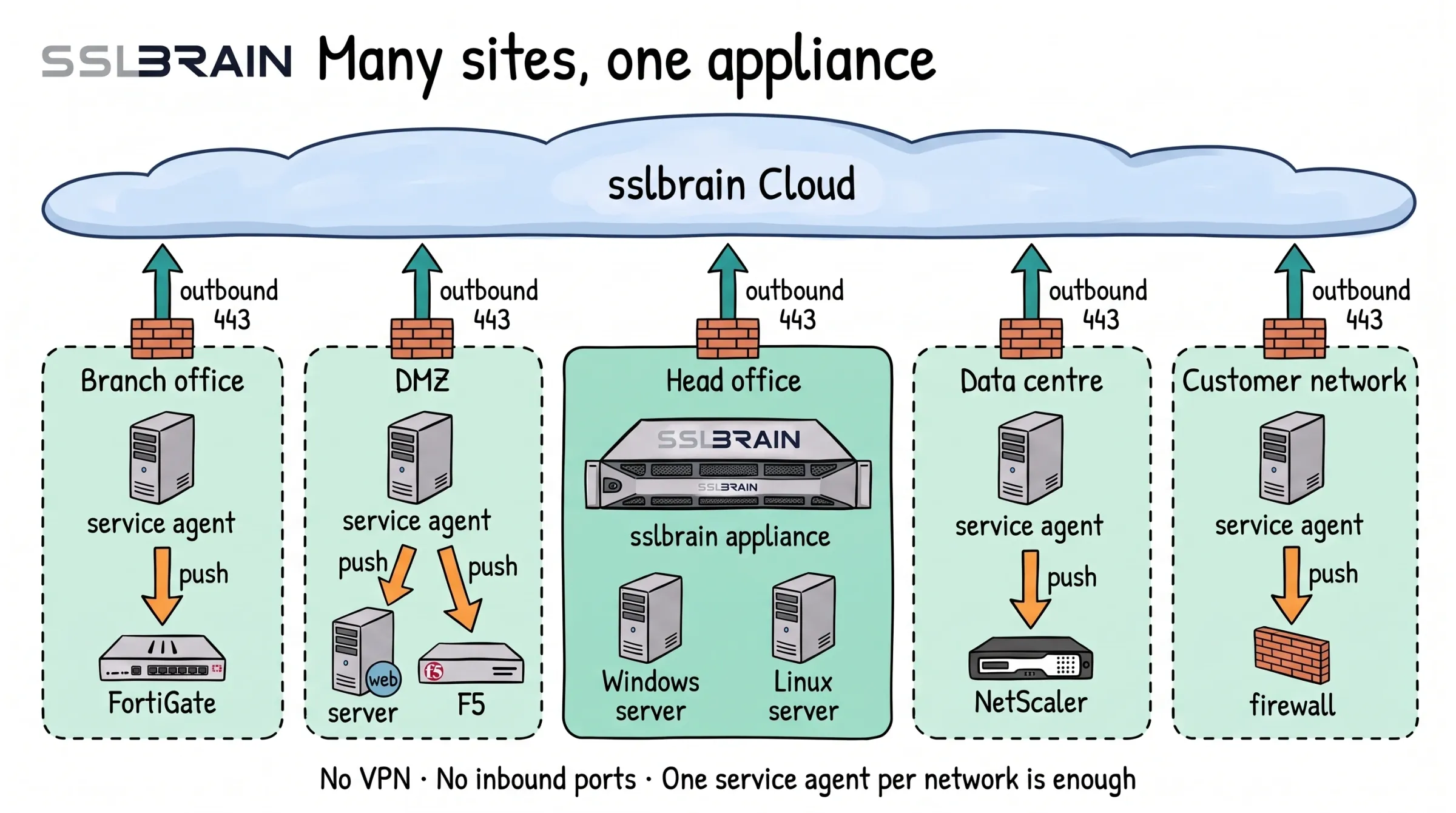
- The sslbrain appliance sits in the head office. Each of the other networks, such as a branch office, a DMZ, a data centre or a customer network, gets one service agent.
- Each network connects only outbound on port 443, through its own firewall, to sslbrain Cloud. There are no connections between the networks.
- The service agent delivers certificates to the equipment in its own network, such as FortiGate, a web server, F5, NetScaler or a firewall.
- No VPN and no inbound ports. One service agent per network is enough.
One appliance, many customer networks
If you run IT for several customers, one appliance in your own network can serve them all. Each customer network, a DMZ included, gets its own service agent and connects only outbound to sslbrain Cloud.
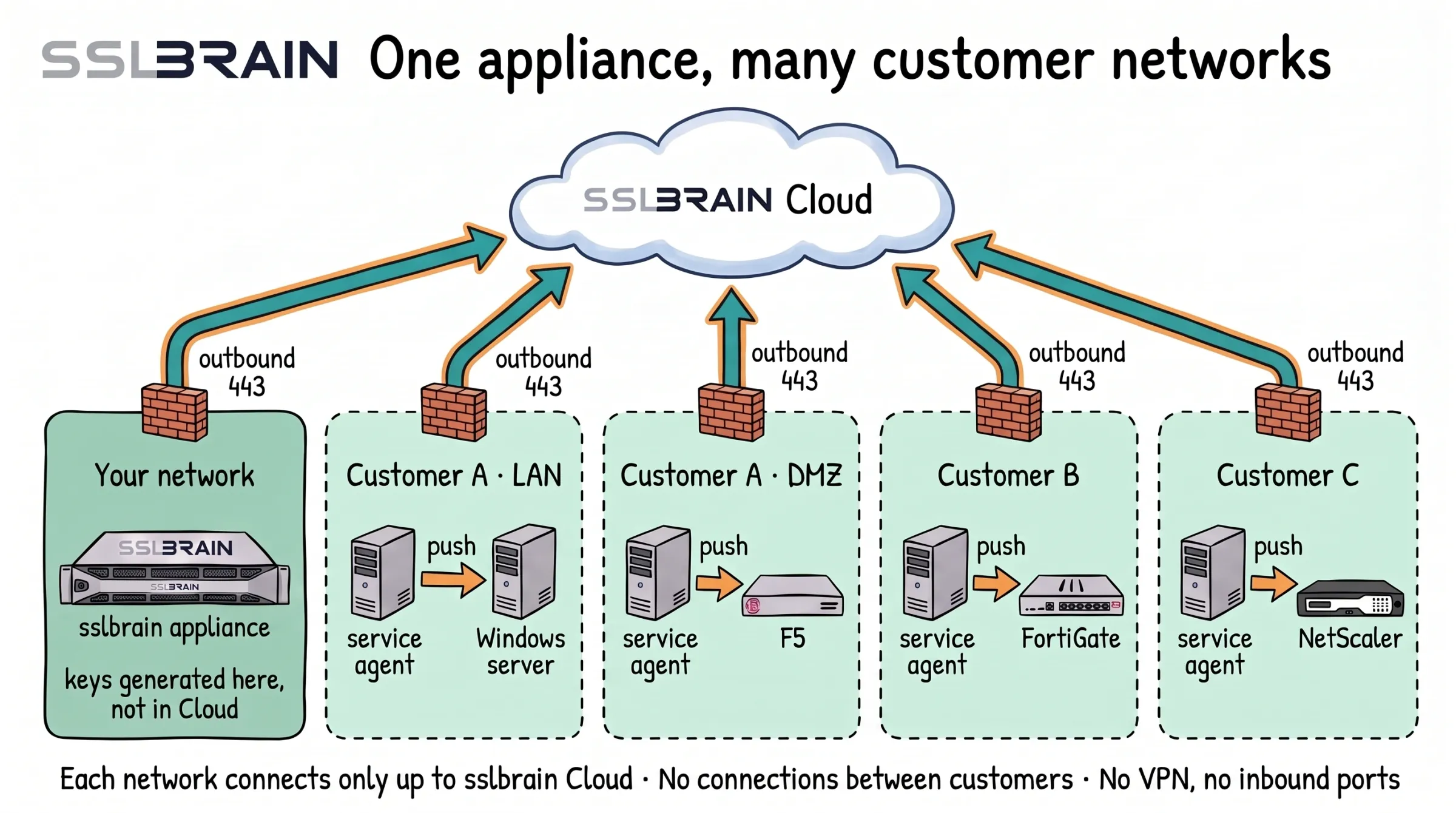
- One sslbrain appliance in your own network serves many customer networks. The private keys are generated on the appliance, not in sslbrain Cloud.
- Each customer network gets a service agent. A customer’s DMZ is a network of its own with its own service agent.
- Each network connects only outbound on port 443, through its own firewall, to sslbrain Cloud. There are no connections between customers, and none between a customer’s LAN and DMZ.
- The service agent delivers certificates to the equipment in its own network, such as a Windows server, F5, FortiGate or NetScaler.
- No VPN to the customers and no inbound ports.
Certificate sources
We support any ACME-based CA including:
Free CAs
Paid CAs
Own CA
ACME Cloud certificate flow
Your sslbrain sends the request. ACME Cloud handles the rest.
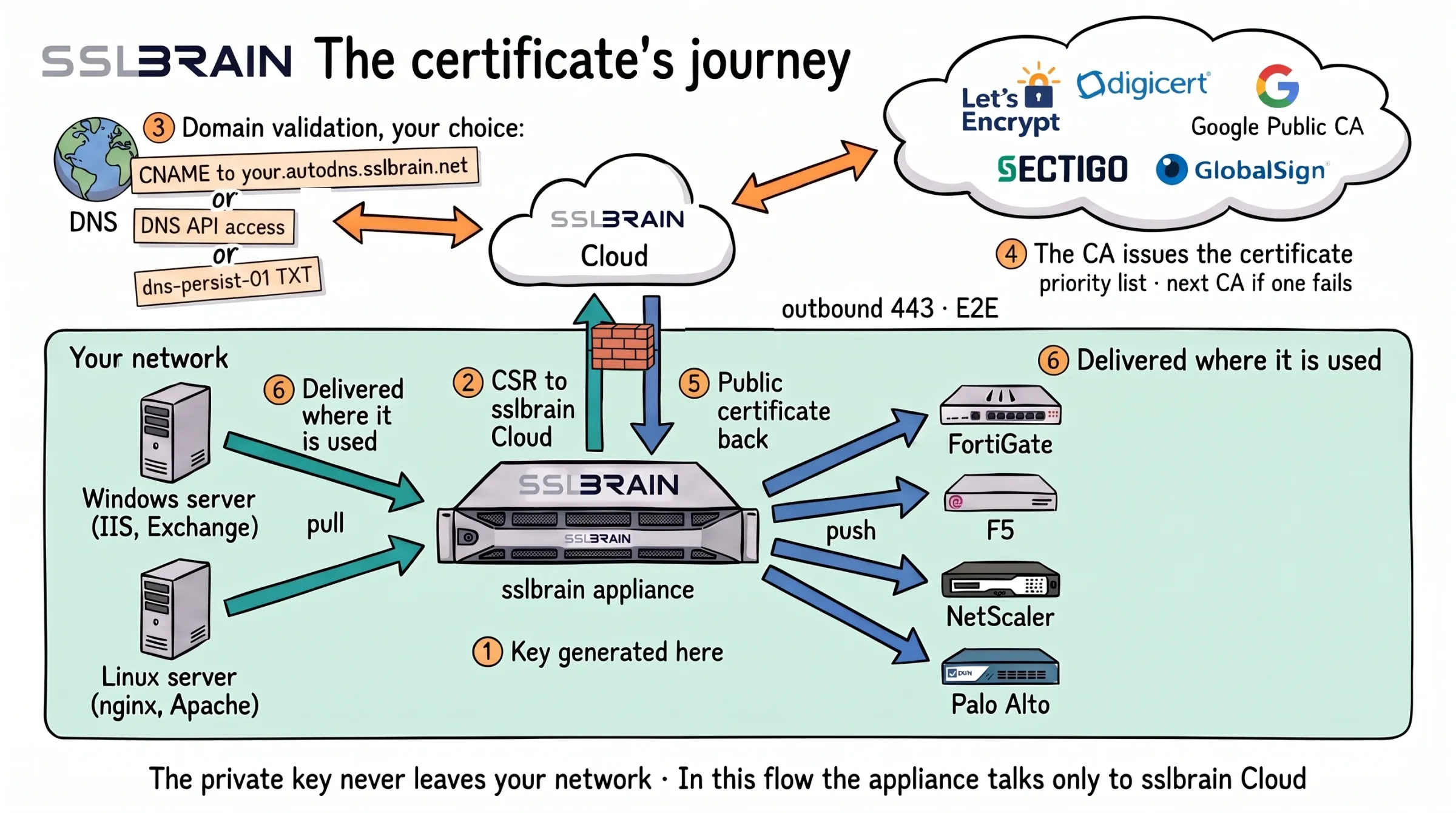
- The sslbrain appliance generates the private key on your network. sslbrain Cloud never sees it.
- The appliance sends the certificate request (CSR) to sslbrain Cloud, outbound HTTPS on port 443, E2E encrypted. In this flow the appliance talks only to sslbrain Cloud.
- sslbrain Cloud proves the domain is yours, the way you choose: a CNAME delegation to your.autodns.sslbrain.net, access to your DNS provider’s API, or a dns-persist-01 TXT record. Any one of them is enough.
- The CA issues the certificate: Let’s Encrypt, DigiCert, Google Public CA, Sectigo or GlobalSign. sslbrain Cloud follows a priority list and moves on to the next CA if one fails.
- The public certificate comes back to the appliance over the same outbound connection.
- The appliance delivers it where it is used: service agents on Windows and Linux servers (IIS, Exchange, nginx, Apache) fetch it, and the appliance pushes it to FortiGate, F5, NetScaler, Palo Alto and other equipment.
Vault and encryption
A database copy is useless without access to your Cloud Vault.
3-layer encrypted vault
All local data including private keys and login credentials is encrypted with XChaCha20-Poly1305 and a 256-bit key via libsodium. Encryption keys are wrapped on the appliance with the master key. The master key never leaves the appliance. a dedicated vault operated by FairSSL in the EU holds only the KEK that wraps the master key on disk; the KEK lives only in memory at boot and is discarded after unwrap.
Every time sslbrain starts, it fetches the KEK from sslbrain Cloud with the appliance's own credentials, and the KEK is rotated at every start. A copy of the database is therefore useless without access to your Cloud Vault.
Cloud hands the KEK only to the appliance's own credentials. A copied appliance is detected and locked until the account owner confirms it; the 12 backup words open the vault without Cloud.
This effectively protects against data access by copying files or server images. The server must of course still be protected locally.
Agent execution and encryption
Secure execution from orchestrator to server. No secrets in files, no scripts on disk.
Stdin execution
Scripts are piped directly to the interpreter via stdin. No temporary script files are written to disk. Secrets are passed as environment variables, not command-line arguments.
echo "$script" | bash -s echo "$script" | python3 - PowerShell.Create() Own keys and encrypted messages
The install code is used only for the first enrolment. After that each agent has its own key pair, and every message is signed and encrypted with AES-256-GCM, both directly and through Cloud, which cannot read them.
Agent signing
Every script that runs on your servers is signed. No exceptions.
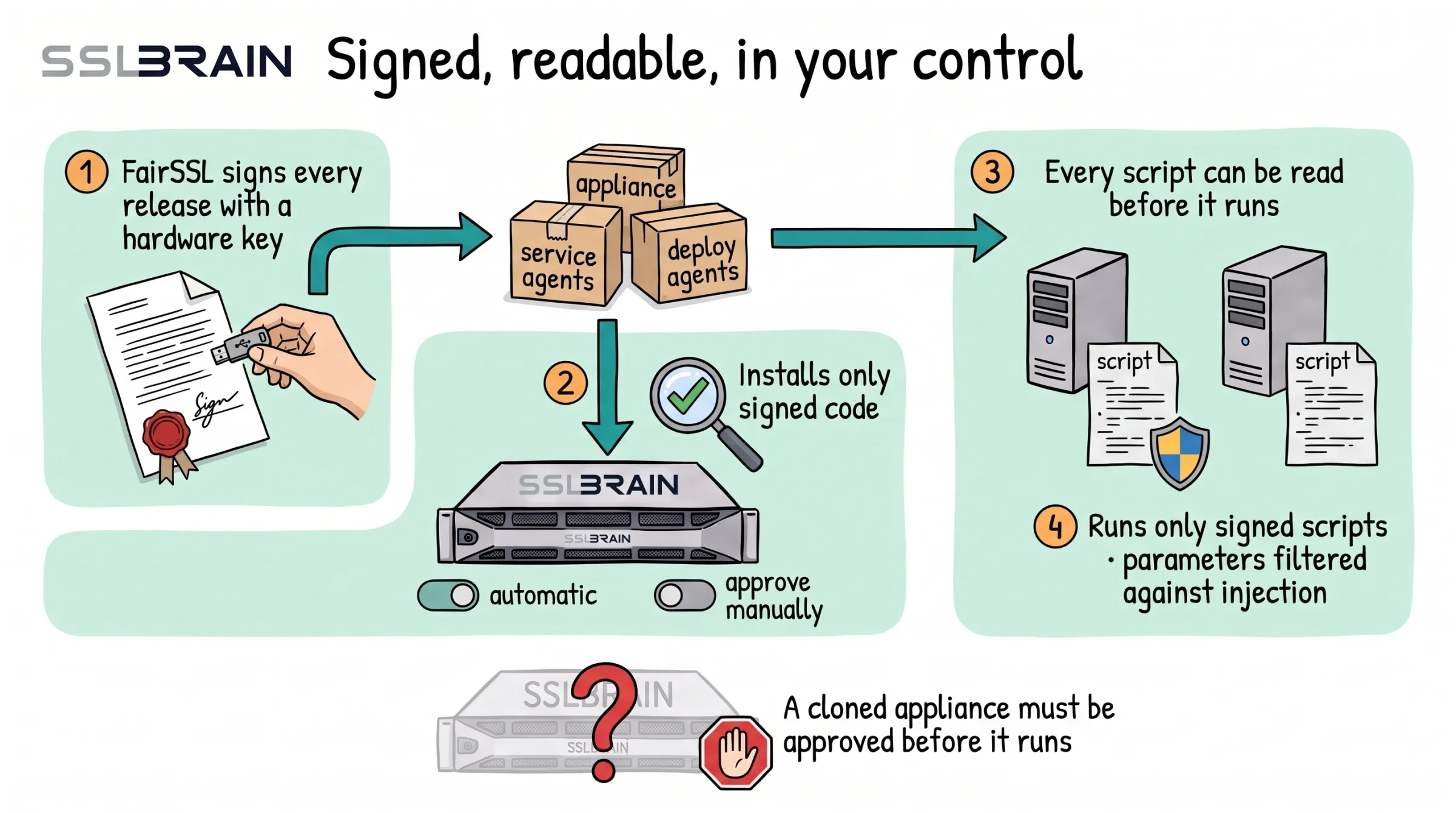
- FairSSL signs every release with a hardware key (YubiKey): the appliance, the service agents and the deploy agents.
- The appliance installs only signed code. Updates come automatically, or you approve them manually.
- Every script can be read before it runs on your servers.
- The servers run only signed scripts, and the parameters are filtered against injection.
- A cloned appliance must be approved before it runs.
YubiKey-signed agents
Every catalogue script is signed by FairSSL with ECDSA P-384 via YubiKey. Per-file signatures. A suggestion from a user is reviewed, locked and released by FairSSL under FairSSL's signature. The Windows Service Agent only runs signed files.
ScriptPolicy + Group Policy
Every server has a ScriptPolicy defining what it accepts. By default the agents run only agents and scripts signed with FairSSL's hardware key. Your own agents run only where you switch them on. The policy is set on the server and can be locked via Group Policy; the appliance cannot change it.
Supported platforms
From Windows to Linux to network appliances.
Windows
Linux
Network
Custom
Protocols
Standards-based from top to bottom.
Certificate issuance
Validation
_dnsauth for a whole domain Deployment
Scripting
Code transparency
Everything is inspectable. No black boxes.
sslbrain core
sslbrain is PHP source-available. You can read every line of code running on your server.
Agents and tools
Agents are YAML + scripts on GitHub. The Windows Service Agent is .NET and verifies signatures. sslbrain handles the ACME protocol against the CA so your servers never talk to a CA themselves.
Everything that runs at your site is readable code: the appliance, the service agents and the install agents for push and pull. Nothing at your site is hidden. The Windows agent is delivered as an MSI, and you can build it yourself from the source code. The code is on github.com/sslbrain.
If something is compromised
What an attacker can and cannot do in each part of the system.
sslbrain Cloud
Can stop an appliance, which is the lock against cloning, and refuse a licence. Cannot see the data on the appliance, control the appliance, send tasks to your servers or install anything. Updates need FairSSL's YubiKey signature, and you can choose manual updates.
The appliance
Can ask the agents already installed to run FairSSL-signed agent packages with input the attacker chooses. A package can only do what it was made for: certificates, bindings and restarting the service that belongs to them. Cannot publish updates or new FairSSL agents. Your own agents run only where you have switched them on at the server. The push credentials in the appliance's vault can be used by the attacker.
A service agent
Gives access only to the server it is on. Its key cannot be used for other servers, and the appliance can block it.
Enterprise Security Guarantees
Three architectural commitments that set sslbrain apart.
No-Takeover Architecture
sslbrain Cloud cannot send tasks to your servers or install anything on them. Your servers run only code FairSSL has signed on a hardware key, and your own agents where you have allowed them. A compromised appliance can still direct your agents to run FairSSL-signed scripts with attacker-chosen inputs, including installing an attacker-supplied certificate, and only ever at the privilege you granted the agent. What it cannot do is introduce new or unsigned code.
Audit-Ready Source
sslbrain is source-available. Your security team can read every Python, Bash, and PowerShell script before it runs on your servers. The compiled Windows agent is signed twice: Authenticode on the MSI, and a release manifest signed on FairSSL's YubiKey that pins the MSI's hash. You can also build it yourself from the source code.
Hardware-Rooted Trust
Every agent is signed with ECDSA P-384 using a YubiKey hardware security key. The private signing key never leaves the physical device. Signatures are verified on every execution. Tampered or unsigned scripts are rejected before they run.
Get started
Download sslbrain and manage your certificates in minutes.