Step 5 of 8 · Without an agent
Devices without an agent
Copy link to the page “Devices without an agent”Equipment that cannot run an agent is connected without one. The appliance connects to the device using a login that sslbrain stores. Servers are connected with the service agent (Connect servers).
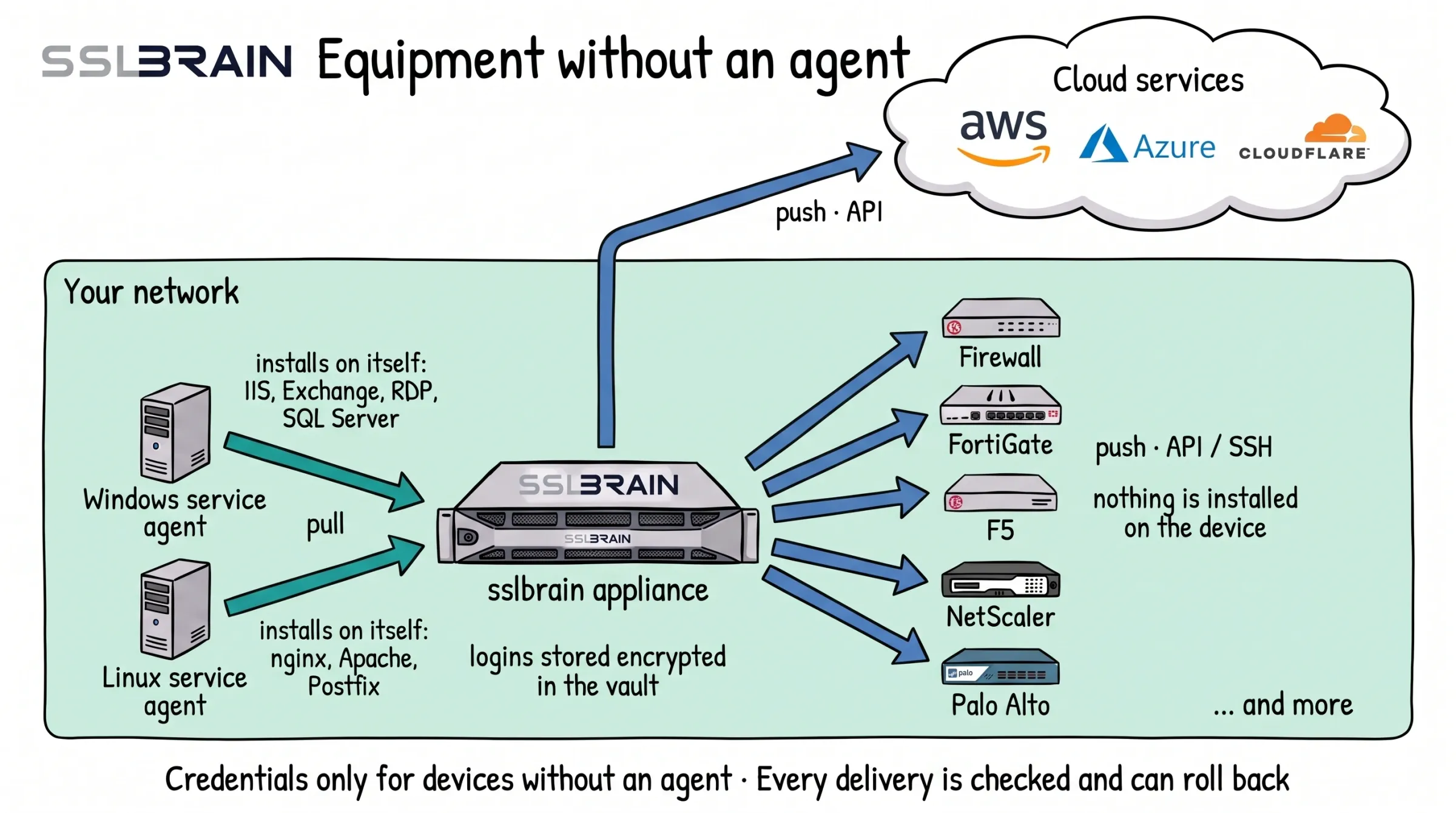
- Windows and Linux servers get a service agent. It fetches the certificate from the appliance and installs it on its own server: IIS, Exchange, RDP and SQL Server on Windows, nginx, Apache and Postfix on Linux.
- Equipment that cannot run an agent, such as FortiGate, F5, NetScaler and Palo Alto, gets the certificate from the appliance. It logs in through the device’s API (usually port 443) or over SSH (port 22) and installs it. Nothing is installed on the device.
- Cloud services such as AWS, Azure and Cloudflare get the certificate from the appliance through their API.
- The appliance stores logins only for equipment without an agent, encrypted in its vault. Every delivery is checked, and if it fails, sslbrain can roll back to the certificate that was there before.
Add a device
Copy link to the section “Add a device”Devices with SSH include VMware ESXi, pfSense and FortiMail. Devices and services with an API include FortiGate, F5 BIG-IP, Citrix NetScaler, Kemp LoadMaster, Palo Alto, Sophos, Synology, vCenter, NetApp, Cisco FDM, Azure, AWS, Google Cloud, Cloudflare and Akamai. The full list is under Integrations.
The appliance must reach the device with SSH (port 22 by default) or with the device’s API over HTTPS (port 443 by default). Only an administrator can add a device.
-
Open Servers and click Add device. The form opens at once.
-
Fill in the form:
- Device type: Network device with an API (HTTPS), Network device with SSH or Linux or Unix server with SSH.
- IP address and Hostname: fill in one or both. sslbrain connects to the hostname when it is given, otherwise to the IP address.
- Port: only when the device does not use the default port. Empty means 22 for SSH and the integration’s own default port for an API, usually 443. Sophos, for example, answers on 4444 and Synology on 5001. The port can be corrected later on the server’s page.
- Credentials: the list shows only credentials that fit the type: SSH Key and SSH Password for SSH, API Token, API Key + Secret and Custom for an API. If the credential does not exist yet, click Create credential and choose SSH Key, SSH Password, API Token or API Key + Secret. It is stored encrypted and chosen in the form at once. A Custom credential is created under Credentials (Credentials).
- Display name (optional): without a display name the device is shown by its hostname or IP address.
-
Click Add device.
-
The server’s page opens. Click Test connection. The status becomes Online.
-
Click Run discovery. The device’s services then appear under Managed Endpoints.
If the device is missing while you create a rule, click Add device in the wizard’s first step. The same form opens on top of the wizard, and what you have already chosen is kept. The device then appears in the list, ready for Run discovery (Create the rule).
Credentials
Copy link to the section “Credentials”Logins and keys are created under Credentials with Add credential. They are stored encrypted in the appliance’s vault and never leave it.
| Type | Used for |
|---|---|
| SSH Password, SSH Key | Devices where sslbrain delivers the certificate over SSH, for example VMware ESXi and pfSense |
| API Token | Systems with a REST API, for example a load balancer or a CDN |
| API Key + Secret | Systems that need a key pair, for example AWS or Akamai |
| DNS API | Domain validation with your DNS provider (Prove the domain is yours) |
| Custom | Free fields for an agent you have written yourself |
Minimum role to use decides who can create rules with the credential: administrator and owner, or owner only.
Devices over SSH
Copy link to the section “Devices over SSH”sslbrain sends the script to the device over SSH and runs it there. Nothing is installed on the device.
- Use SSH Password or SSH Key. Keys can be Ed25519, ECDSA or RSA, also with a passphrase.
- The account must be able to write the certificate files and reload the service. If the account is not root, turn on Elevate via sudo on the credential. Give the account passwordless sudo for the commands that install the certificate and reload the service.
- sslbrain remembers the device’s SSH host key. If the key changes, sslbrain sends a notification, but by default the installation goes ahead.
Devices and cloud services through an API
Copy link to the section “Devices and cloud services through an API”The package runs on the appliance and calls the device’s or service’s API. Nothing is installed on the device.
Create an API Token or API Key + Secret with the permissions the package needs to upload and bind a certificate.
If it fails
Copy link to the section “If it fails”- Status Unreachable or Auth failed: A server without an agent cannot be reached.
- The certificate is not installed: Installation on the server fails.